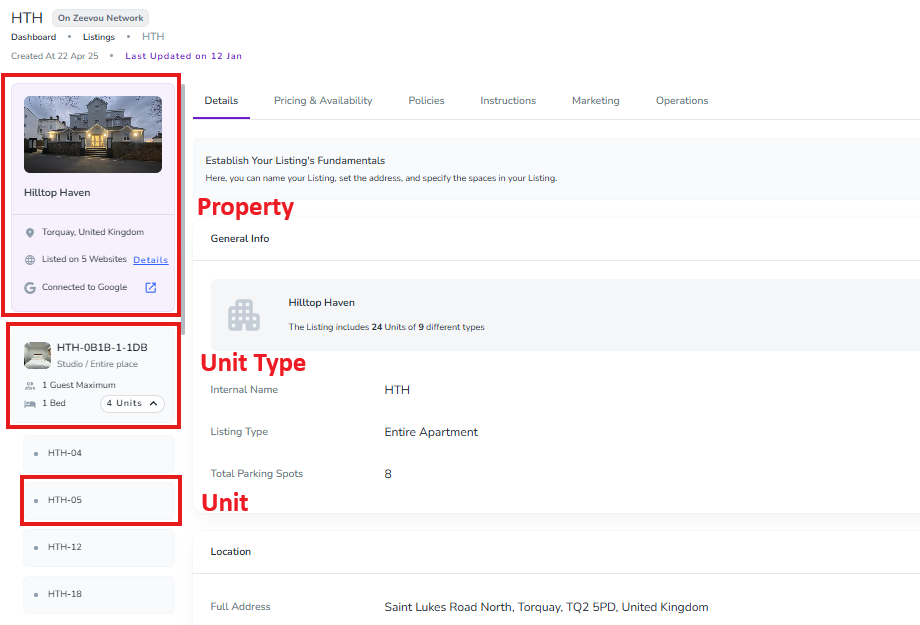
You can skip this section if you only manage unique properties, such as individual houses or apartments.
Yes — if you manage a hotel, motel, guesthouse, apartment building, serviced apartments, or another property with multiple similar units.
No — if each of your properties is unique. Continue to the next step.
Zeevou uses three levels:
Zeevou | What It Means | Example |
Listing | The overall property or building | Seaside Apartments |
Unit Type | A type of identical accommodation | 2-Bed Apartment |
Unit | An individual accommodation of that type | Apartment 101 |
The Listing is the overall property, building, or complex.
Example: Seaside Apartments
A Listing can contain one or more Unit Types.
A Unit Type is a group of identical accommodations that guests can book.
Examples:
Studio
1-Bed Apartment
Deluxe Double Room
Units within the same Unit Type should have the same:
Size
Layout
Capacity
Amenities
If accommodations are different, create separate Unit Types.
Think of a Unit Type as:
An Airbnb listing
A Booking.com Room Type
A Unit is an individual room or apartment within a Unit Type.
For example:
1-Bed Apartment → 3 Units
Apartment 101
Apartment 102
Apartment 103
Guests book the Unit Type, not a specific Unit. Zeevou assigns an available Unit to the booking, so you can move guests between identical Units when needed.
Zeevou | Airbnb | Booking.com |
Listing | No direct equivalent | Property |
Unit Type | Listing | Room Type |
Unit | Individual accommodation | Number of rooms |
The main difference is that Airbnb generally treats each accommodation as a separate listing, while Zeevou groups identical accommodations under one Unit Type.
Imagine you manage Riverside Apartments:
Listing: Riverside Apartments
Unit Type: 1-Bed Apartment → 3 Units
Apartment 101
Apartment 102
Apartment 103
Unit Type: 2-Bed Apartment → 2 Units
Apartment 201
Apartment 202
You therefore manage one Listing, two Unit Types, and five Units instead of five separate listings.
This structure helps you:
Manage information once: Set pricing and accommodation details for the entire Unit Type.
Manage availability efficiently: Zeevou manages availability across identical Units.
Maximize occupancy: Zeevou can assign available Units to bookings automatically.
Manage bookings flexibly: Move guests between identical Units without changing what they booked.
If you manage multiple units in one property:
Create one Listing for the property.
Create a Unit Type for each type of accommodation.
Add the number of Units you have for each Unit Type.
Name your Units, such as Apartment 101 or Room 205. This is optional but recommended.
Important: Only group accommodations into the same Unit Type if they are genuinely identical. If their size, layout, capacity, or amenities differ, create separate Unit Types.
Open your Listing and use the left-hand menu to switch between Listing, Unit Type, and Unit information.