Zeevou supports two connection types for connecting your account to external booking channels.
Your connection type determines how Zeevou exchanges information with your channels and which connection and mapping instructions you need to follow.
Connection Type A provides a more comprehensive integration with supported OTAs, including the ability to push listings and synchronise listing content.
Connection Type B primarily synchronises rates, availability, restrictions, and bookings. It also supports integrations with GDS and specialist hotel channels and allows you to run multiple rate plans in parallel for the same unit type on channels that support them, such as Booking.com.
Please Note that:
Most new Zeevou accounts use Connection Type A.
If you want to discuss switching to Connection Type B, you can raise a Service Request through the chat function in the bottom-right corner of Zeevou.
You can identify your connection type directly from your Zeevou account.
Log in to Zeevou.
Go to Listings from the main menu.
Look for Manage Channels in the top-right corner.
Check which option applies to you:
If you can see Manage Channels, you are using Connection Type A.
If you cannot see Manage Channels, you are using Connection Type B.
New to Zeevou? If you recently signed up, you will typically be using Connection Type A, so you can proceed directly to the Connection Type A instructions.
Note: You can connect to Google directly from the listing page without upgrading to the paid Channel Manager.
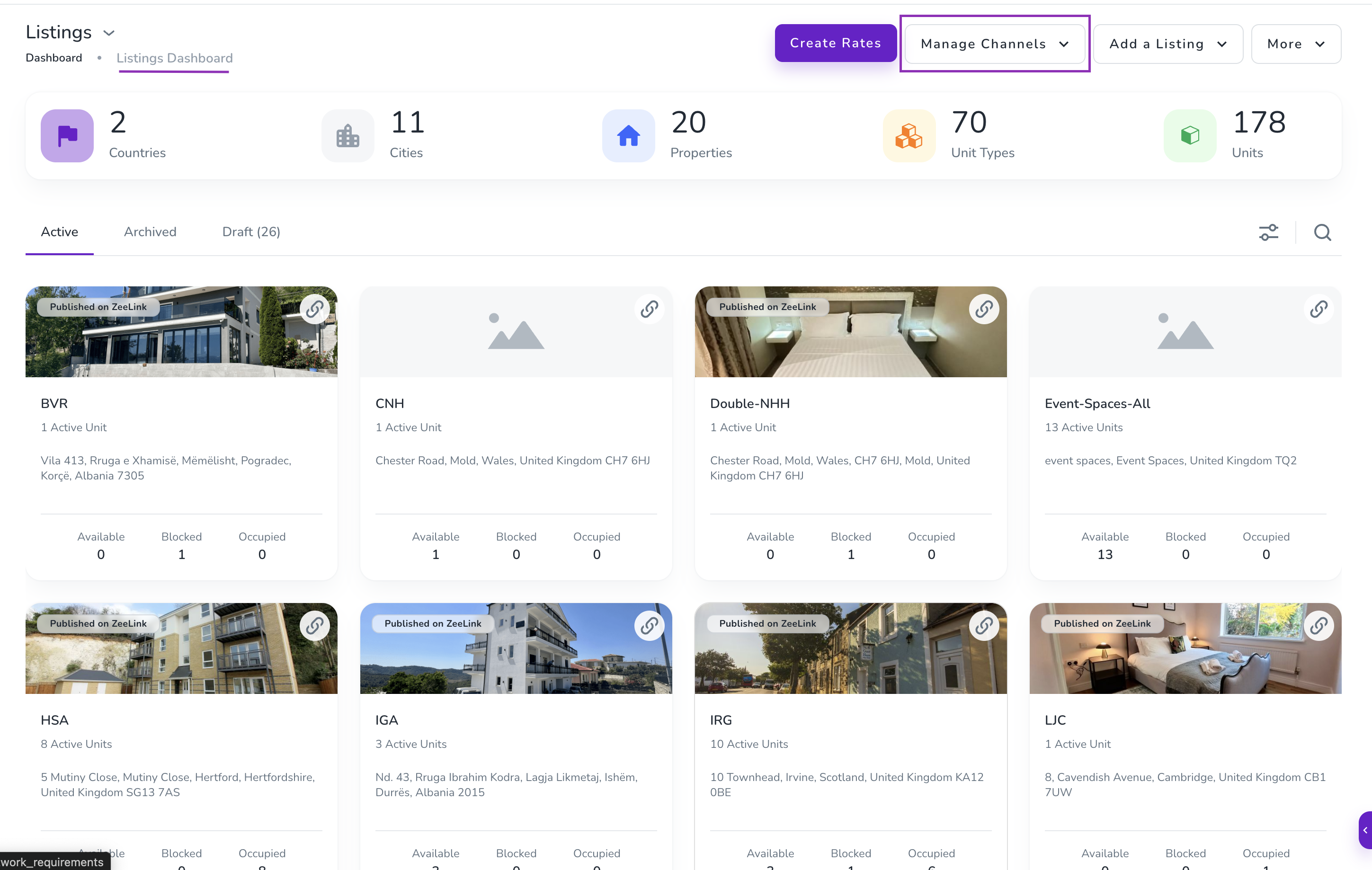
Connection Type A typically involves connecting your Zeevou account to the OTA (Online Travel Agency) using direct, often tighter integrations (like QuickConnect or extranet sync).
You need your Zeevou Property ID when mapping properties between Zeevou and a connected channel.
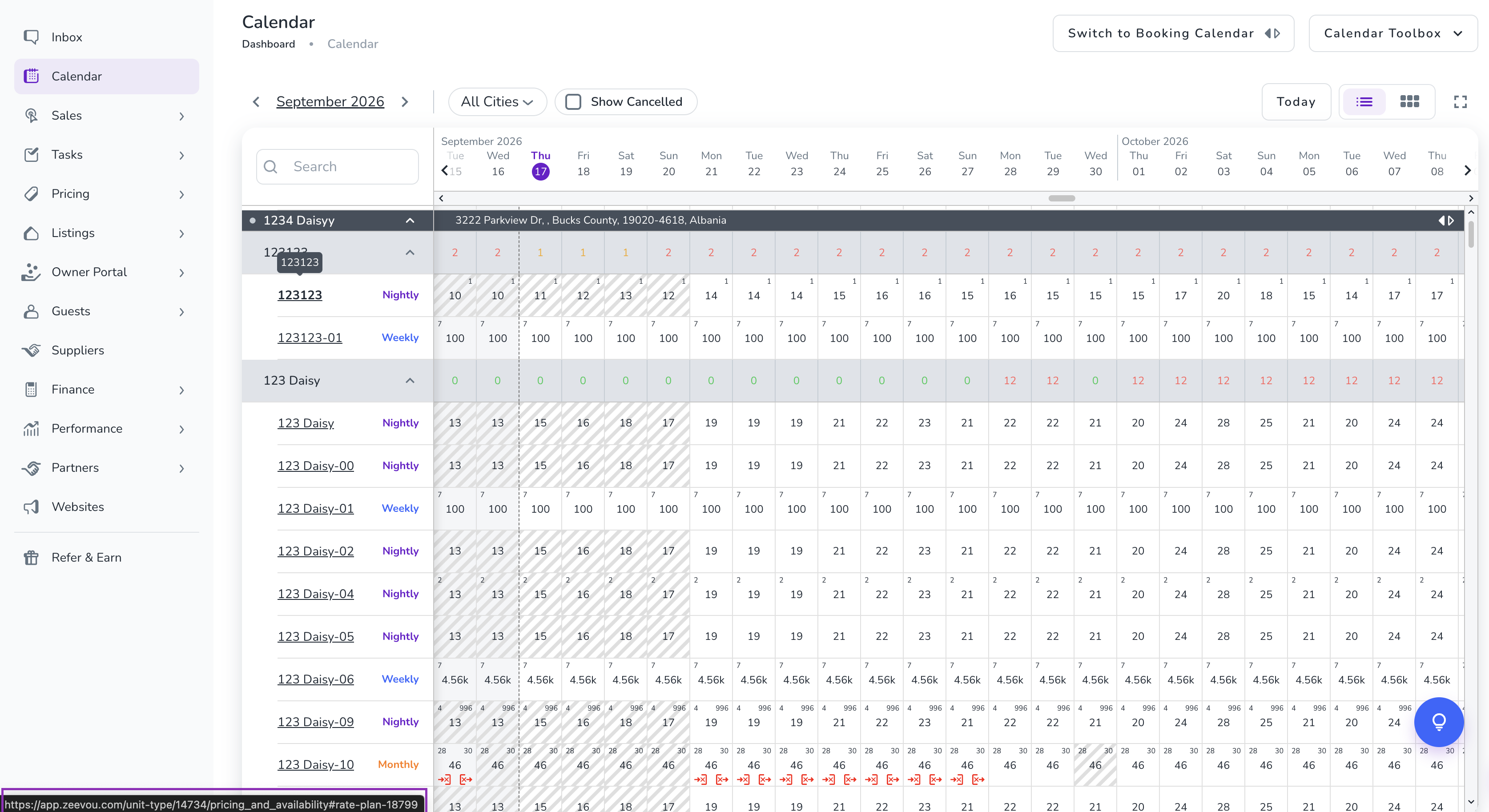
For Connection Type A, the Zeevou Property ID corresponds to the Rate Plan ID in Zeevou.
To find your Rate Plan ID:
Go to Calendar → Rates & Availability Calendar.
Hover over the required rate plan in the calendar.
The Rate Plan ID appears in the bottom-left corner of the page.
Note: During the channel mapping process Connection Type A, you can find the corresponding Zeevou Property ID in the Property Settings section. This ID can be used when mapping properties between Zeevou and connected channels.
Type B often involves manual steps, such as emailing support or changing providers via the OTA extranet before starting the mapping process in Zeevou. This flow might be more hands-on initially but achieves similar synchronisation in the end.
The table below shows which connection types are available for each channel:
Channel | Connection Type A | Connection Type B |
Agoda | ✓ | ✓ |
Airbnb | ✓ | ✓ |
Altovita | ✓ | — |
Blueground | ✓ | — |
✓ | ✓ | |
BYND Homes | ✓ | — |
Clickstay | ✓ | — |
Cuddlynest | ✓ | — |
Despegar | ✓ | ✓ |
Emerging Travel Group | ✓ | — |
FloridaRentals | ✓ | — |
Expedia | ✓ | ✓ |
Glamping Hub | ✓ | — |
Golfhom | ✓ | — |
Google Travel | ✓ | — |
Holidu | ✓ | — |
Homes & Villas by Marriott Bonvoy | ✓ | — |
HomeToGo | ✓ | — |
Hopper / Capital One | ✓ | — |
Hostelworld | ✓ | ✓ |
Houfy | ✓ | — |
HouseStay | ✓ | — |
HousingAnywhere | ✓ | — |
HVN | ✓ | — |
LekkeSlaap | ✓ | — |
Livily | ✓ | — |
Livjaza | ✓ | — |
Luxury Escapes | ✓ | — |
Maimon Group (LPMS) | ✓ | — |
MakeMyTrip | ✓ | — |
Muchosol | ✓ | — |
Oliver's Travels | ✓ | — |
Onefinestay | ✓ | — |
Plum Guide | ✓ | — |
Rakuten Vacation Stay | ✓ | — |
Rental Escapes | ✓ | — |
Savvy | ✓ | — |
Situ | ✓ | — |
✓ | — | |
Stay | ✓ | — |
StayOne | ✓ | — |
StaySense | ✓ | — |
The Dyrt | ✓ | — |
The Quintess Collection | ✓ | — |
Top Villas | ✓ | — |
TravelStaytion | ✓ | — |
Travel with Aspect | ✓ | — |
✓ | ✓ | |
VacationRenter | ✓ | — |
Vacation Finder | ✓ | — |
Villa Finder | ✓ | — |
Villaway | ✓ | — |
VivreStays | ✓ | — |
Vrbo | ✓ | ✓ |
Whimstay | ✓ | — |
Pegipegi | — | ✓ |
KlikHotel | — | ✓ |
Odigeo | — | ✓ |
Goibibo | — | ✓ |
Silverdoor Apartments | — | ✓ |
D-EDGE (formerly Fastbooking) | — | ✓ |
HostelsClub | — | ✓ |
DOTW | — | ✓ |
MitchellCorp | — | ✓ |
Mr & Mrs Smith | — | ✓ |
HotelsCombined | — | ✓ |
Hotelbeds | — | ✓ |
Sunhotels | — | ✓ |
SpeedyBooker | — | ✓ |
Pan Pacific | — | ✓ |
HRS | — | ✓ |
Bookit | — | ✓ |
BookEasy | — | ✓ |
SynXis | — | ✓ |
Traveloka | — | ✓ |
Meta Channel | — | ✓ |
Pacific BedBank | — | ✓ |
Needitnow | — | ✓ |
Hotelbonanza | — | ✓ |
Hotel Tonight | — | ✓ |
Travelport | — | ✓ |
TravelGuruXML | — | ✓ |
Smartie | — | ✓ |
ezTravel | — | ✓ |
AOT | — | ✓ |
SimpleBooking | — | ✓ |
Tablet Hotels | — | ✓ |
Tourplan | — | ✓ |
Dorms | — | ✓ |
Travelanium | — | ✓ |
Booking Engine | — | ✓ |
STAAH Max | — | ✓ |
If you are currently using Connection Type A and would like to discuss switching to Connection Type B, raise a Service Request through the chat function in the bottom-right corner of Zeevou.
Our team can advise you on the available options and the implications for your channel connections.
Once you know your connection type, configure your Fees, Mark-up, and Sync Settings to control how your channel connections work.
