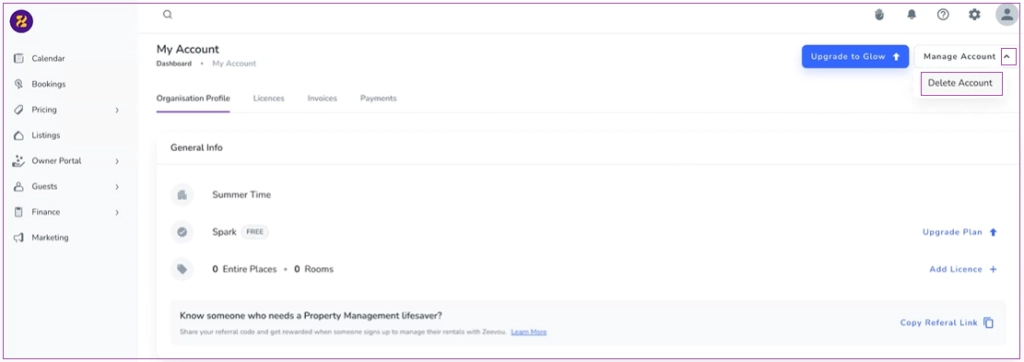
If you are using the Free Plan, you can simply cancel your subscription. To do so, log in to your Zeevou account. On the top right of the page, click on Profile icon and select Account. On My Account Dashboard, click on Manage Account and select Delete Account.
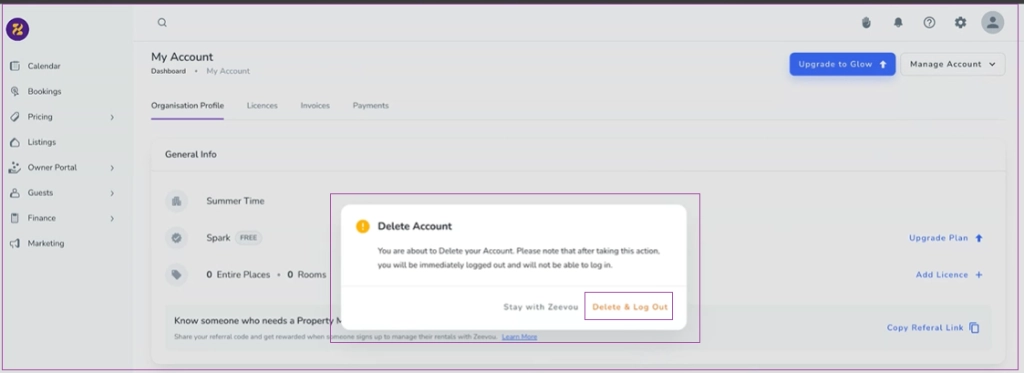
Then, a waring window pops up. You can select Delete & Log Out.
First of all, you should deactivate your listing and then remove all the mappings with the channels. Then, you can cancel your subscription on Zeevou:
Log in to your Zeevou account.
Click the profile icon in the top-right corner and select Account from the dropdown.
On the My Account Dashboard, click Manage Account and choose Cancel Subscription.
Note : If you are on an Annual Package, you can request cancellation at any time; however, it will only take effect at the end of your current commitment period. If you are on a Monthly Package, you can cancel at any time and will not be charged for any future months.
You cannot cancel your subscription if:
You have unpaid invoices.
Your rate plans are mapped.
You have active bookings.
Annual Contracts:
Cancellation is only allowed in the final month of your contract.
If you attempt to cancel earlier, a message will prompt you to contact the Success Team for assistance.
