
To purchase additional licences in Zeevou, follow the steps below:
Log in to app.zeevou.com.
Click your Profile icon in the top-right corner.
Select Account from the drop-down menu.
On the Account page, click Buy More Licences.
Select the required licence type(s) and choose the quantity.
Click Apply and Pay.
Complete the payment using either:
A Saved Card, or
A New Card.
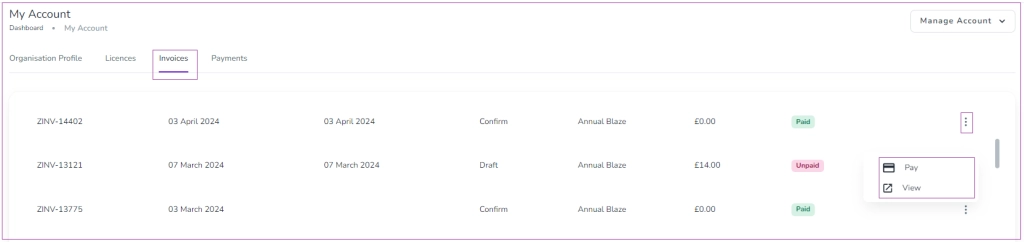
Managing Invoices
You can manage your invoices directly from the Account page.
Go to the Invoices tab.
Click the three dots next to an invoice to:
Pay (for unpaid invoices), or
View Invoice.
Viewing a Paid Invoice
If you click View on a paid invoice, you will be redirected to the invoice page where you can:
Export to Excel
Download Invoice
Show Details
This allows you to keep a record of your payments and download copies for your accounting purposes.